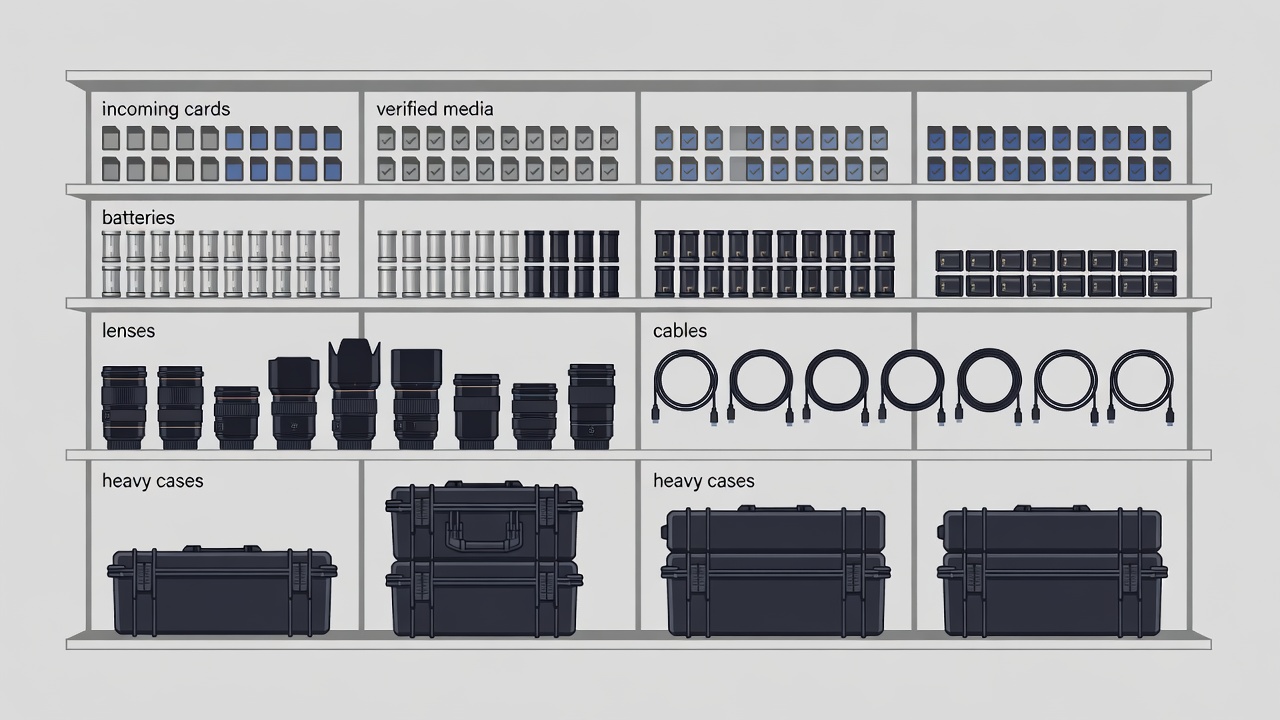
Create one incoming landing zone
Choose a clear tray or small surface where a camera bag can be unpacked without covering the keyboard. Keep liquids away. The landing zone is temporary: it holds items waiting for a decision, not permanent storage for everything that lacks a home. Put a simple intake list beside it so you can follow the same sequence when tired. Start with cards and project notes before charging or cleaning equipment.
Separate cards awaiting ingest from cards that have passed your backup checks. Use written status labels rather than relying only on case position or color. Do not label a card “ready” merely because files appear on the working drive. Your reset rule should state what verification and independent copies are required before the card can return to camera use.
Make media status explicit
Copy the original camera folder structure where your workflow requires it, and use a transfer method that supports verification when practical. Record the card identifier, project, destination and transfer status. A checksum comparison can detect differences between copies, but it does not prove that the camera recorded the intended scene or that a file will remain readable forever. Open representative clips, check audio and preserve relevant sidecar files.
The familiar 3-2-1 backup principle means three copies, on two different types of media, with one copy off-site. It is a planning baseline, not a guarantee. Choose a strategy suited to the project, including offline or immutable protection where appropriate. RAID is not a substitute for backup, and synchronization can propagate deletions. Test a restore before you need it and document when original cards may be reused.
Arrange shelves by frequency and weight
Put frequently used, manageable items between comfortable low and high reach positions. Store heavy cases low, without turning the floor into an obstacle course. Keep rarely used equipment out of the daily reach zone. Follow shelf load limits and the manufacturer’s anchoring instructions; tall storage may need suitable anti-tip fixing. Avoid overhead storage that requires lifting a heavy case above your head.
Use dividers or shallow containers so small adapters do not disappear beneath camera bodies. Label a location with the item type and, when useful, a short identifier. A label such as “USB-C data — tested” tells you more than “miscellaneous.” Keep a small separate area for faulty or unverified equipment so it cannot quietly return to a working kit.
A storage system should show what is missing, not just hide what is present.
Treat charging as an attended process
Follow the battery and charger manufacturer’s instructions, including compatibility, temperature limits and required clearances. Use a stable surface away from combustible clutter and keep chargers ventilated. Do not use damaged, swollen or leaking batteries. Isolate them from normal use and seek manufacturer guidance or an appropriate local disposal service; do not put lithium batteries in ordinary household waste.
Mark charged and discharged batteries with a simple, consistent status method. Keep terminals protected during storage and transport as directed by the manufacturer. Avoid creating a dense charging drawer just because it looks tidy when closed. A closed compartment can trap heat, conceal damage and make a fault harder to notice. Do not leave charging arrangements unattended or overnight unless the relevant instructions explicitly allow that use.
Store accessories without ambiguity
Coil cables gently using a method suitable for their construction. Avoid tight bends at connectors and use reusable ties rather than pulling a knot tight. Separate video, audio, power and data leads so a connector shape does not become the only clue. USB-C describes a connector, not a guaranteed data speed, display capability or charging capacity. Label cables by verified purpose when the distinction matters.
Keep lenses capped and follow the manufacturer’s storage guidance for humidity and temperature. Do not seal damp equipment into a case after a wet shoot. Let it dry safely using the prescribed care procedure. Silica gel and humidity indicators can support a controlled storage routine, but neither replaces proper drying or maintenance. Keep cleaning materials separate from media and avoid improvised chemicals on optical surfaces.
Finish with a small reset
- Confirm media status.Update the ingest record and keep uncleared cards separate.
- Return tools to labelled homes.Check empty spaces against the next kit list.
- Flag exceptions.Record faults, missing adapters and batteries needing attention.
- Clear tomorrow’s landing zone.Leave the desk ready to receive the next task.
Review the system after a real departure and return. If a label is ambiguous or a container is always left open, change that small part. Useful organization makes the next decision obvious; it does not require every piece of equipment to be on display.