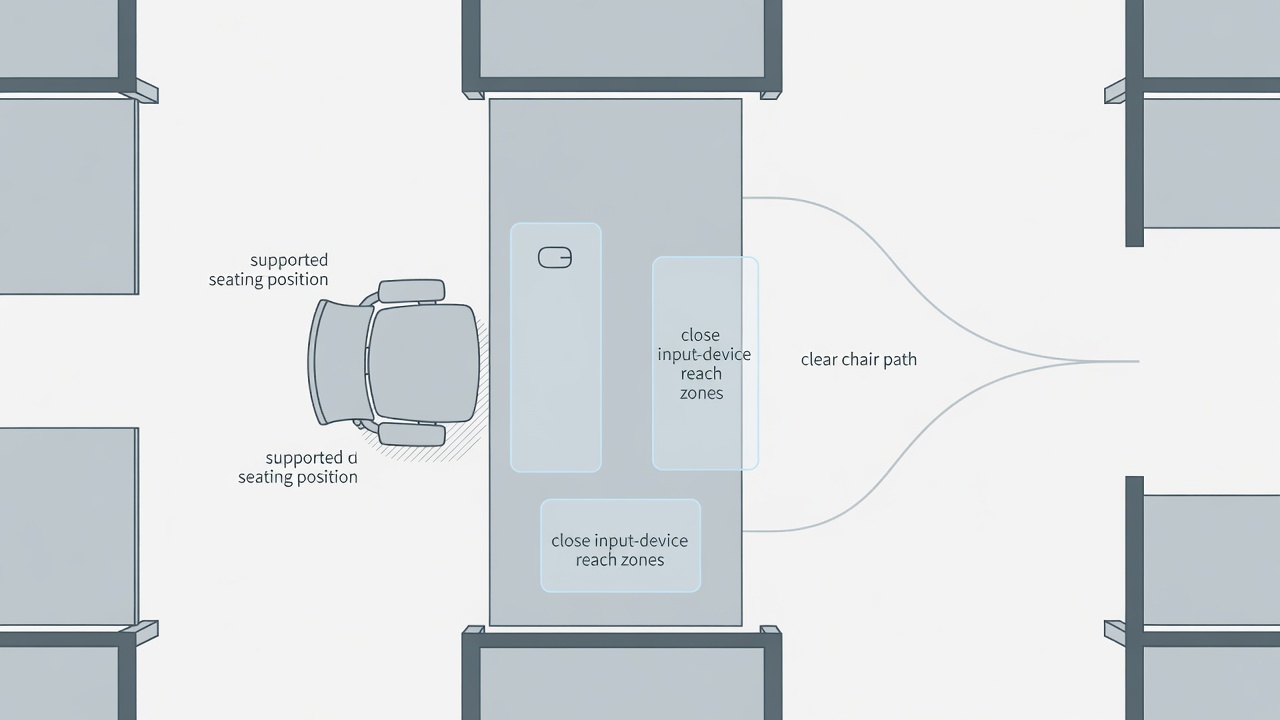
Map the room before the furniture
Sketch the door swing, windows, sockets, radiator and clear walking route. Mark the chair in its pulled-back position, not just tucked neatly under the desk. Then trace the path from camera bag to card reader and from desk to storage. If a case blocks that route, move the case before considering a bigger desk. Keep ventilation openings clear and avoid placing equipment where a spill or an open window could reach it.
Measure the usable depth with the actual monitor stand in place. A deep-looking surface can become shallow once a large base, speakers and a keyboard occupy it. Use paper outlines to test a different arrangement before buying anything. Record the measurements you need rather than relying on a product photograph.
Set support from the floor upward
Sit back with your feet supported and your thighs free from pressure at the seat edge. Adjust the chair so your shoulders can relax when your hands meet the keyboard. If the desk height forces the chair upward, a stable footrest may help support your feet. Do not balance them on loose boxes. Check that the armrests do not push you away from the surface or lift your shoulders while you work.
There is no single posture to hold for an entire session. Alternate supported positions and get up regularly. Persistent pain, tingling or numbness calls for advice from a qualified health professional, not another accessory recommendation. OSHA’s Computer Workstations eTool and the UK Health and Safety Executive’s display screen equipment guidance offer useful assessment prompts; neither makes your individual setup automatically suitable.
Build around repeated hand movements
Place the keyboard and pointing device in the closest comfortable zone. Keep the mouse near the keyboard rather than beyond a control surface you rarely use. A compact keyboard can reduce lateral reach, but check whether losing a number pad would complicate your editing shortcuts. In Adobe Premiere Pro, DaVinci Resolve or Final Cut Pro, map the commands you actually repeat before adding a separate controller.
Put headphones, the card reader and a notepad in a secondary reach zone. Store lens cases, spare leads and chargers elsewhere. Avoid resting your wrists on a sharp desk edge while typing. A soft support is not a substitute for moving the input devices closer or reducing pressure. Test each change during a real editing task rather than judging it from a posed seated position.
The desk should make ordinary movements easy, not make every tool visible.
Give cables a visible route
- Start at the device.Label both ends with the connection and destination, not just a color.
- Allow movement.Leave enough slack for the monitor arm, chair clearance and full travel of an adjustable desk.
- Follow one serviceable path.Use reusable ties and accessible supports; keep cables off walking routes.
- Finish at a safe connection.Follow the equipment rating and manufacturer’s instructions. Do not daisy-chain power strips.
Keep ventilation and power connections accessible. Never run leads under rugs or pinch them against furniture. For new sockets, damaged wiring or questions about circuit capacity, use a qualified electrician. Test a sit–stand desk through its full movement while watching every cable; stop if anything tightens, snags or pulls a device toward the edge.
Choose stability before features
A useful editing desk stays stable while you type and supports the combined load of equipment and any monitor arms. Check the manufacturer’s load limits and whether the surface can accept the intended clamp. Thin, hollow or glass tops may need a different mounting solution. Drawer units should not take over knee space. A standing option is useful only if it fits your room and you will actually change position.
Run one ordinary session
Import a card, edit a short sequence, listen on headphones and prepare an export. Note each awkward reach without trying to solve everything at once. Move one item, repeat the task and compare. End by clearing the input area and returning equipment to its place. This small reset reveals whether the layout supports work or merely looks organized when unused.
Repeatable desk check
- Chair and exit route remain clear.
- Feet, back and forearms have suitable support.
- Frequently used controls stay close.
- Cables permit movement without tension.
- One clear area remains for incoming media.